Stop juggling tabs. Start orchestrating.
A native desktop IDE for orchestrating AI coding CLIs. Run Claude Code, Codex, Gemini, and more in parallel — each isolated in its own git worktree.
Your agents, your rules.
Bring your own API keys. Maverick never proxies — every backend authenticates through its own CLI config.
Claude Code · Codex CLI · Gemini CLI · Aider · Ollama · Custom CLI
A cockpit, not a terminal tab.
VSCode-style workbench wrapped around your AI CLIs — multiple agents in parallel, each in its own worktree.
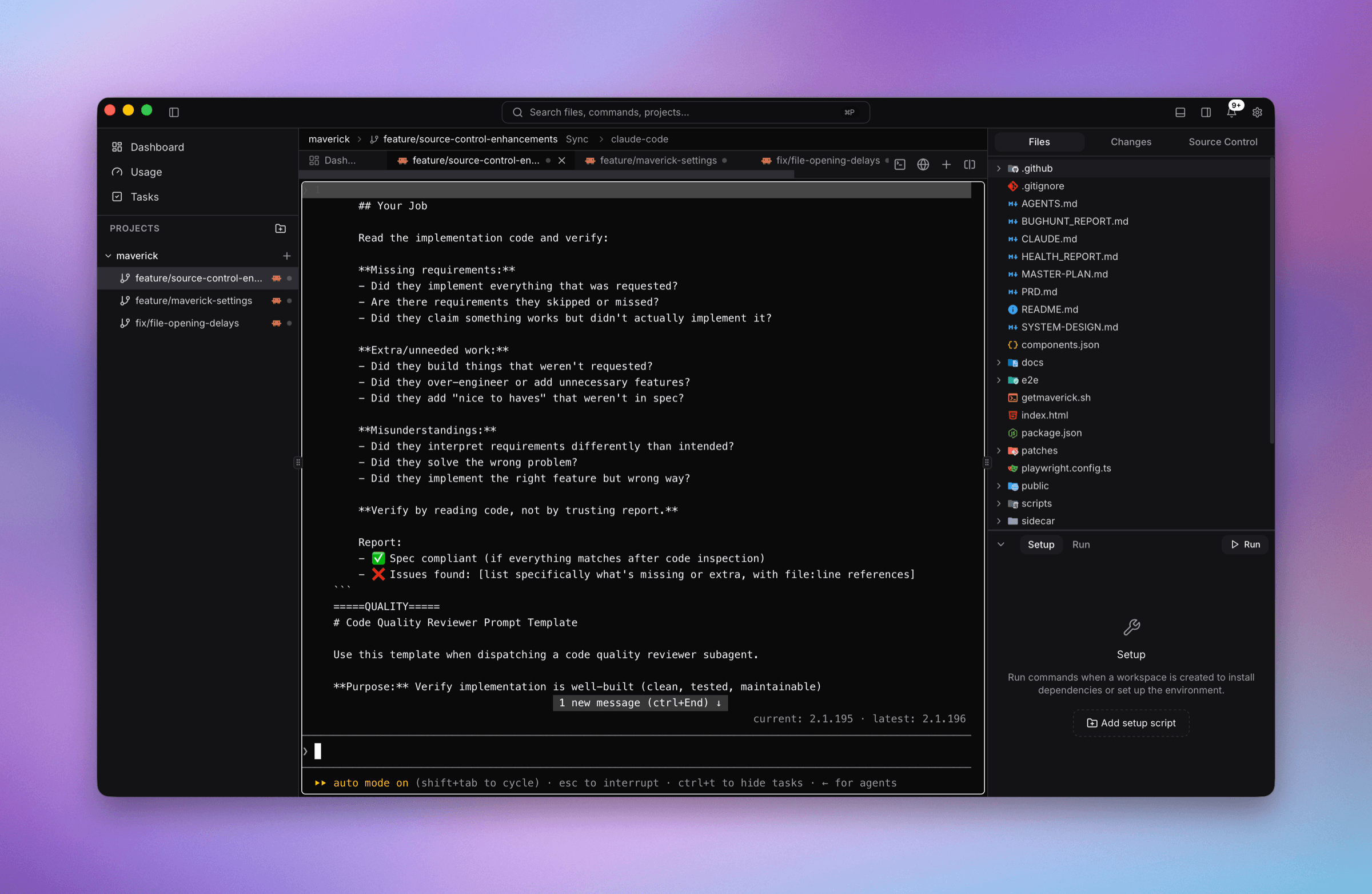
Full workbench around your AI CLIs
Multiple agents in parallel, each in its own worktree — every CLI running live in a full PTY beside a file tree, diff viewer, and Setup panel.
Orchestrate, don't micromanage.
Every agent gets its own sandbox — run many in parallel without stepping on each other.
Multi-agent parallel
Run Claude Code, Codex, Gemini, Aider, and Ollama simultaneously — up to 6 agent workspaces visible in a single window. Each agent works in its own branch.
Git-isolated worktrees
Every agent run gets its own git worktree — isolated working copy, isolated branch, no cross-contamination.
Terminal-native PTY
Each agent runs as a real CLI in a full PTY — complete TUI fidelity. Split the grid with ⌘D / ⌘⇧D; everything stays alive across workspace switches.
VSCode-style workbench
ActivityBar, PrimarySideBar, EditorArea, AuxiliaryBar, Panel, StatusBar — 60+ configurable keyboard bindings. Command Palette at ⌘⇧P.
Built-in tools
Kanban task boards, embedded browser with element inspector, full git UI, MCP server lifecycle, file previewers, and workspace presets.
- Kanban⌘⇧K
- Browser⌘⇧B
- Git⌘⇧G
- MCPSidebar
Git & PR workflow
Full git module with branch management, staging, stash, blame, and conflict resolver. AI Code Review at ⌘⇧R. One-click PR creation pushes the branch and runs gh pr create --fill.
14 bundled themes
Maverick Dark/Light, One Dark Pro, Dracula, Nord, Catppuccin, Tokyo Night, and more. Geist Mono + Nerd Font for terminal glyphs.
Keyboard-first
Every action reachable without a mouse. Workspace jumps at ⌘1–⌘9. Quick Open at ⌘P. Bare metal. Locally owned.
Running in minutes.
From source or one-liner — your agents, your keys, your machine.
Install prerequisites
Clone and run
git clone https://github.com/Justmalhar/maverick
cd maverick && bun install
bun run tauri dev
Or use the installer
curl -fsSL https://getmaverick.sh | bashFull docs and build instructions on GitHub. First Rust compile takes a minute; subsequent builds are fast.
Free & open source. MIT licensed.
No subscription. No account. Bring your own agent subscriptions.
Everything below is included.
API usage is billed by your agent CLIs.
Multi-agent orchestration
Up to 6 parallel agent workspaces in one windowGit-isolated worktrees
Each agent gets its own branch and working copyVSCode-style workbench
ActivityBar, panels, command palette, 60+ shortcutsBuilt-in tools
Kanban, browser, git UI, MCP servers, file previewers14 bundled themes
Maverick Dark, Dracula, Nord, Catppuccin, and moreUsage tracking
Token and cost estimates from each CLI's own logsPlatforms
macOS (arm64 + x86_64), Windows (x64), and Linux (x64 + arm64).Stack
Tauri v2 · React 19 · Bun · Rust · xterm.js
Maverick never bills you — it only surfaces what your CLIs report. You pay only for what your agents use.
Platform download links coming soon. Build from source or use the installer in the meantime.
Yours, not ours.
Bare metal. Keyboard-first. Locally owned.
No API keys in Maverick
Maverick never sees your credentials. Every CLI uses its own config — ~/.claude.json, ~/.config/codex, and so on.
Zero inference cost
Maverick never calls AI APIs. It spawns CLI subprocesses. Your subscriptions stay yours — we only surface what your CLIs report.
All data local
SQLite database at ~/Library/Application Support/maverick/ on macOS. No cloud dependency. Your code, prompts, and history stay on your machine.
No telemetry
No account. No sign-in. Nothing phones home. OS notifications for agent events — native and in-app, not sent anywhere.
Questions, answered.
Everything you need to know about Maverick ADE.